
This page explains a traffic or event plan that will not save because a municipality review has locked it.
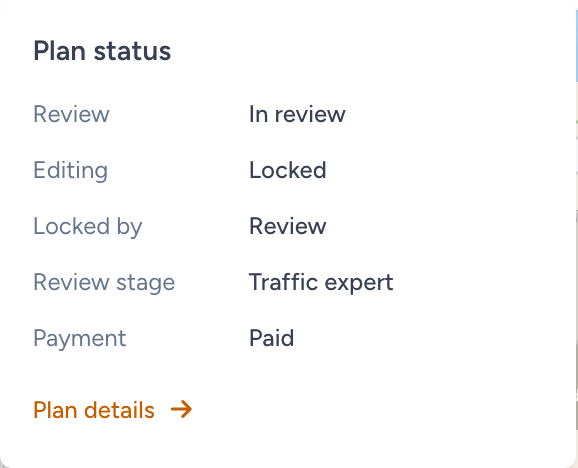
Open Plan status from the status or lock indicator before the title. Use this page when Editing is Locked and Locked by includes Review. A review outcome and the active lock sources are separate facts. If Editing is Read-only because you opened a share link or are not the assigned editor, use I can’t open or edit a plan instead.
In-app Approved is not a legal permit. Extra steps may sit outside the app.
In review by municipality
When the municipality clicks Start review session, the drawing locks. Comments shows In review by municipality and Your plan is locked while the reviewer looks at it. We will notify you when they respond.
In Plan status, check Review, Editing and Locked by. A locked plan shows Locked for editing, including when you opened a public read-only link. Drawing tools may explain Plan is under review, or This event plan is locked and cannot be edited. in an event plan. These tooltips are separate from the status panel's labels. You can still pan, zoom and read Messages from municipality, but cannot place signs or objects.
You do not start that first session yourself. If Comments still says Ready to submit?, wait for their procedure (often a Sharable link). If you try anyway, the app can say Initial review requests are currently started by the municipality. Submit your plan through the municipality procedure first.
If Comments says Place traffic objects to start a review or Place event objects to start a review, the dossier has nothing to attach yet. Click Place event objects (or place traffic signs) on the real site. Areas, Lines & Routes, and Add text do not count for event review routing.
Leave the plan alone until they answer. Do not Duplicate to dodge the lock — the copy drops the review history. Could not save traffic plan during a lock means the server already closed the drawing; wait for the reload copy: Your latest changes could not be saved. Reloading the latest version...
Approved stays locked
Plan approved in Comments means this drawing is accepted in Traffic Chart. The card says This plan has been approved. Further edits are disabled. In Plan status, Review shows Approved and Editing shows Locked. Drawing tools can explain Plan is approved and locked or This plan is locked because it has been approved.
That lock is the point: the reviewed file stays stable. Share-link viewers can still open it read-only.
In-app Approved is not a legal permit by itself. If you must change an approved plan, ask the municipality how they want a new version. You cannot unlock it yourself. Resubmit error if you try: This plan is already approved and cannot be resubmitted.
You cannot move a plan under review
From Personal, Move to organization is blocked while review is active: Under review — move unavailable. Body: Plans with an active municipality review stay in Personal. You can still copy this plan into an organization if you need a separate version. Tooltip: A plan under review cannot be moved. Copy it instead, or wait until the review is finished.
Wait until review is finished if you meant Move. Copy is still allowed if you need a separate organization version.
Wait for Changes requested
You edit again when the municipality asks for a new version and your editing access allows it. Check Editing and Locked by: a separate external or administrative lock can remain after review ends.
| Status | Can you edit? |
|---|---|
| In review by municipality / Submitted | No |
| Changes requested (and feedback has reached you) | Yes — edit the same plan, Save, then Send for review |
| Review closed (rejected) | Yes, then Send for review if they want another look |
| Plan approved | No — stays locked |
Send for review uses Municipality, Message (optional), Send review request. Success: Review request sent. Fail: Could not submit review request. No reviewer: We could not find a reviewer / No reviewer is linked to the selected municipality.
If Direct communication is off, you may first see The traffic expert left feedback. The events department will forward it to you. Wait until Events uses Forward feedback to submitter. Until then you cannot resend. Pending copy: Municipality feedback has not been forwarded to you yet.
Comments may still show coming soon with We are finalizing the new sidebar experience. Comments will unlock after the next release. Map remarks from reviewers still sit on Pin, Arrow, Rectangle when a session is open.
Full walkthrough: Review for organisers. Status panel: Comments, review status, and map notes.
What good looks like
Under review, you wait. After Changes requested, check that the same plan is editable and no other lock remains, then edit it. Send review request locks it again. You did not move or duplicate the file that is in the dossier.
If it still fails
Email customer@traffic-chart.com with the plan URL, the Review, Editing and Locked by information shown in Plan status, and whether you are the assigned editor. Contact support.
Locked by CityLogic
Locked by CityLogic is an external lock, not a municipal review status. Ask the responsible CityLogic contact to release it, then refresh the plan. Editing, deletion, post-instruction changes, editor reassignment and transfer to another workspace stay blocked while it applies. Viewing and exporting remain possible. An independent permitted copy has no CityLogic link or external lock and does not replace the original.
A separate review lock can remain after CityLogic unlocks the plan. A CityLogic link never grants extra edit rights, and public viewers do not see its integration details. Create and open plans from CityLogic.