
Some placement tools sit behind an organization or Pro account. Paying to unlock unlimited signs on one plan (Paid) does not always turn these on. Everyday one-by-one placement is in Working with signs.
Use this when stacks overlap at an intersection, or for a quick look at bulk lines. Skip it if you only place a handful of plates.
If a control is blocked, believe the tooltip. Then see Feature not available for my account.
Bulk signs (organization)
Bulk signs repeats one sign along a line you draw: a row of cones, barrier elements, or the same plate every few meters. Traffic Chart works out the count from the line length and the Length (Connected) or Distance (Separated) you set. Organization workspaces only; in Personal the tool shows Pro feature and You need an organization account to use bulk sign placement.
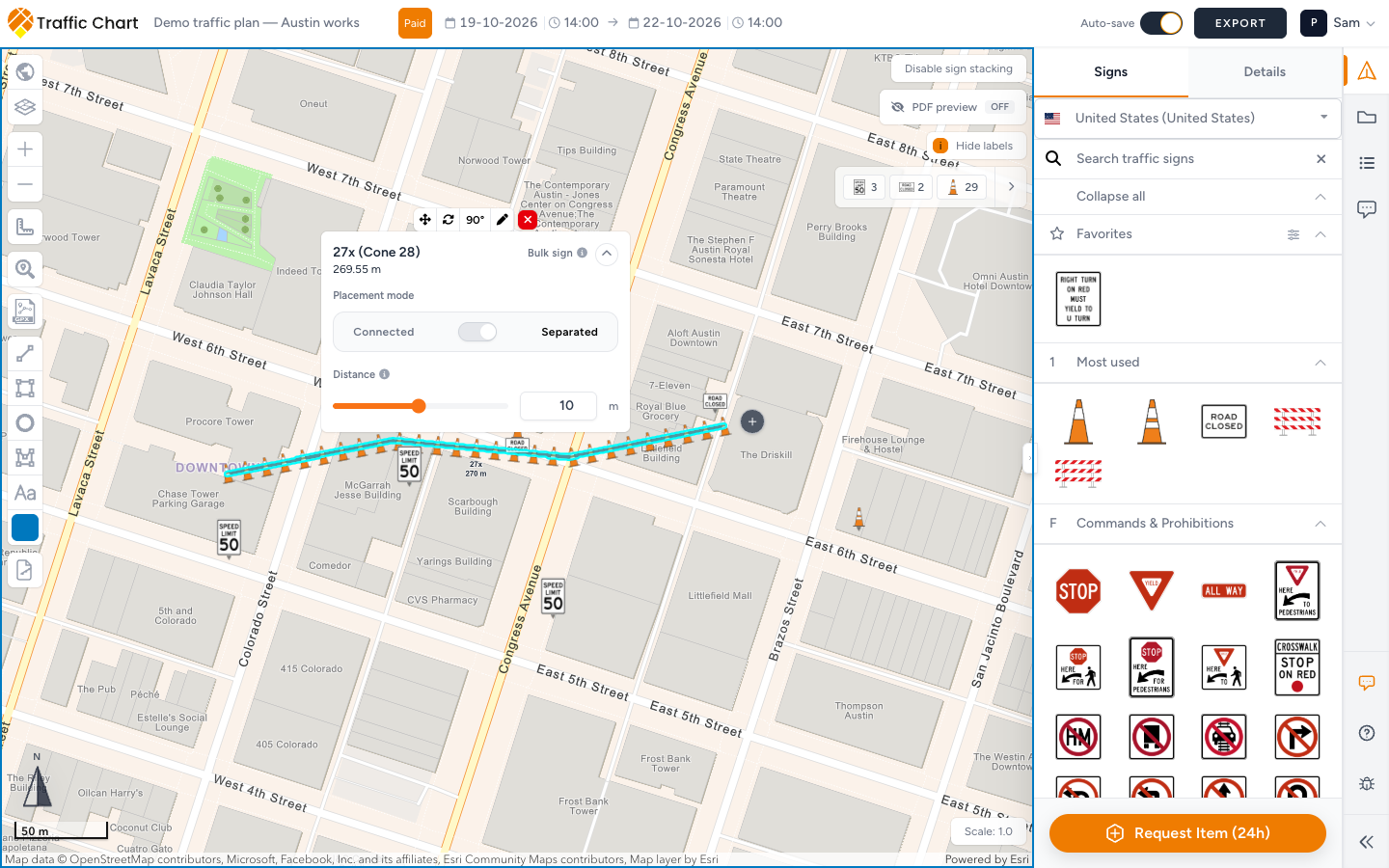
Drawing the line, picking the sign, the two modes, making a line longer, and the quantities on the materials list: Place bulk signs along a line.
Displace sign stack (Pro)
At busy intersections, stacks overlap. Displace sign stack keeps the real coordinate in place and draws the plates offset, joined by a leader line and an origin marker.
The product names this family Move sign stacks. Tooltip: Move sign stacks away from their exact coordinate. The control on the selected sign, next to Move sign, is Displace sign stack.
- Click the stack.
- Press Displace sign stack and drag the drawing aside.
- Confirm the origin marker stays on the roadway and a leader line connects it to the plates.
- Save.
- Check PDF so the paper view matches what you intend.
Without Pro access, the button stays inactive. Tooltip heading Pro feature. Body: You need a PRO account to displace traffic signs. Paying for unlimited signs on one plan does not turn it on.
Displacement is drawing clarity. Crews still need the real-world position (origin marker / Coordinates in Details). Do not treat the offset plates as the install point.
If PDF preview is On and the preview map is unlocked, you may need Lock preview map before you can select a stack (Lock the preview map to select this object.).
What good looks like
Displaced stacks are readable and still point at the true location. Bulk lines follow the road and their counts match what you will order (Place bulk signs along a line).
If something blocks you
| Situation | What to try |
|---|---|
| Bulk signs disabled | Organization workspace / organization account. Tooltip: Pro feature / You need an organization account to use bulk sign placement. |
| Displace sign stack disabled | Pro access. Tooltip: Pro feature / You need a PRO account to displace traffic signs. |
| Anything about a bulk line | Place bulk signs along a line |
| Sign limit during bulk | I can’t place more signs |
| Paid but still no bulk or displace | Unlimited signs ≠ these tools — Feature not available for my account |
| Lock the preview map to select this object. | Lock preview map, then select the stack |